Most teams don't think about LLM observability until something breaks, or until an invoice arrives that nobody can explain.
By that point, you're already doing forensics instead of prevention. This tutorial shows you how to get full visibility into your LLM API calls — costs, latency, token usage, errors — with a single pip install and two lines of code. No changes to your existing call logic.
We'll instrument OpenAI, Anthropic, and Google Gemini in a realistic FastAPI app. The whole thing takes about 15 minutes.
What is LLM observability for Python applications?
LLM observability is the practice of automatically capturing every interaction between your Python application and large language model APIs — OpenAI, Anthropic, Google Gemini, and others. It records the full request and response payloads, token counts (prompt, completion, and cached), latency in milliseconds, estimated cost per call, and any errors including rate limits and timeouts. Unlike traditional application monitoring that tracks HTTP status codes and database queries, LLM observability understands the semantics of AI workloads: which model was used, how many tokens were consumed, what the reasoning chain looked like, and how much each call actually cost. For Python teams running LLM features in production, this visibility is the difference between discovering a runaway retry loop on your monthly invoice and catching it within minutes.
What will you get at the end of this tutorial?
- Real-time cost tracking per endpoint and per model
- Token usage breakdown (prompt vs. completion) for every LLM call
- Latency data across all three providers in one place
- Full error traces, including failed calls that still cost money
- Zero changes to how you call your LLM APIs in Python
Prerequisites
- Python 3.8+
- API keys for whichever providers you use (OpenAI, Anthropic, and/or Google)
- An AmberTrace account (grab a free one here, takes 2 minutes, no credit card)
How do you install AmberTrace for Python?
Install with support for the providers you use. AmberTrace hooks into each provider's SDK automatically — no wrapper classes or custom decorators needed.
# All three providers at once
pip install ambertrace[all]

# Or pick just what you need
pip install ambertrace[openai]
pip install ambertrace[anthropic]
pip install ambertrace[gemini]
If you're managing your own provider SDKs separately:
pip install ambertrace
pip install openai anthropic google-generativeai
Requirements: openai>=1.0.0, anthropic>=0.18.0, google-generativeai>=0.3.0
How do you initialize LLM tracing in your Python app?
This is the only new code you need to add to your application. Everything else stays exactly as it is.
import ambertrace

ambertrace.init(ambertrace_api_key="your_ambertrace_api_key")
That's it. From this point forward, every LLM call in your Python application — OpenAI, Anthropic, Google — is automatically traced. No wrappers, no decorators, no changes to existing call sites.
How do you trace OpenAI, Anthropic, and Gemini calls in Python?
Here's a complete FastAPI app using all three providers. Notice that the LLM call code is identical to what you'd write without AmberTrace — nothing changes.
from fastapi import FastAPI
import openai
import anthropic
import google.generativeai as genai
import ambertrace
import os

app = FastAPI()

# Initialize once at startup. Traces all providers automatically.
ambertrace.init(ambertrace_api_key=os.environ["AMBERTRACE_API_KEY"])

# Initialize your provider clients as normal
openai_client = openai.OpenAI(api_key=os.environ["OPENAI_API_KEY"])
anthropic_client = anthropic.Anthropic(api_key=os.environ["ANTHROPIC_API_KEY"])
genai.configure(api_key=os.environ["GEMINI_API_KEY"])
gemini_model = genai.GenerativeModel("gemini-pro")


@app.post("/summarize")
async def summarize(text: str):
    """Uses GPT-4 for summarization. Traced automatically."""
    response = openai_client.chat.completions.create(
        model="gpt-4",
        messages=[
            {"role": "system", "content": "Summarize the following text concisely."},
            {"role": "user", "content": text}
        ]
    )
    return {"summary": response.choices[0].message.content}


@app.post("/analyze")
async def analyze(text: str):
    """Uses Claude for analysis. Traced automatically."""
    response = anthropic_client.messages.create(
        model="claude-sonnet-4-20250514",
        max_tokens=1024,
        messages=[
            {"role": "user", "content": f"Analyze the sentiment and key themes in: {text}"}
        ]
    )
    return {"analysis": response.content[0].text}


@app.post("/classify")
async def classify(text: str):
    """Uses Gemini for classification. Traced automatically."""
    response = gemini_model.generate_content(
        f"Classify this text into one category (news/opinion/technical/other): {text}"
    )
    return {"category": response.text}
Every call to /summarize, /analyze, and /classify is now automatically traced. In your AmberTrace dashboard, you'll see which endpoint triggered each LLM call, which model was used, the full token breakdown, latency, estimated cost, and any errors.
How do you flush traces in Python scripts?
If you're running a script rather than a long-lived server, call flush() before your process exits to make sure all traces are sent:
import openai
import ambertrace

ambertrace.init(ambertrace_api_key="your_ambertrace_api_key")

client = openai.OpenAI(api_key="your_openai_api_key")
response = client.chat.completions.create(
    model="gpt-4",
    messages=[{"role": "user", "content": "Summarize this document..."}]
)

print(response.choices[0].message.content)
ambertrace.flush()  # Ensure traces are sent before exit
For FastAPI and other long-lived Python servers, you don't need this. Traces are sent automatically in the background.
What data does AmberTrace capture from LLM calls?
For every LLM call your Python application makes, AmberTrace automatically captures the full trace — both successful completions and failures. Here's what gets recorded:
| Field | Description |
|---|---|
| Model name | e.g. gpt-4, claude-sonnet-4, gemini-pro |
| Full message history | All messages in the conversation |
| Parameters | temperature, max_tokens, etc. |
| Token usage | Prompt tokens, completion tokens, total |
| Latency | Duration in milliseconds |
| Timestamp | ISO 8601 UTC |
| Finish reason | stop, length, tool_calls, etc. |
For failed calls, you get the same request data plus the exception type, error message, and error code. This matters more than it sounds: failed API calls are often still billed, and without tracing errors you can't tell where your retry logic is misfiring.
How do you disable LLM tracing temporarily?
Useful for testing or specific code paths where you don't want traces sent. This is particularly handy in CI/CD pipelines or local development where you want to avoid sending test data to your production dashboard.
import ambertrace

ambertrace.init(ambertrace_api_key="your_api_key")

# Disable for a specific block
ambertrace.disable()
# ... LLM calls here are not traced ...
ambertrace.enable()

# Check current state
if ambertrace.is_enabled():
    print("LLM observability tracing is active")
What will you see in the AmberTrace dashboard?
Once you've made a few calls from your Python app, open your AmberTrace dashboard. Here's what LLM observability looks like in practice:
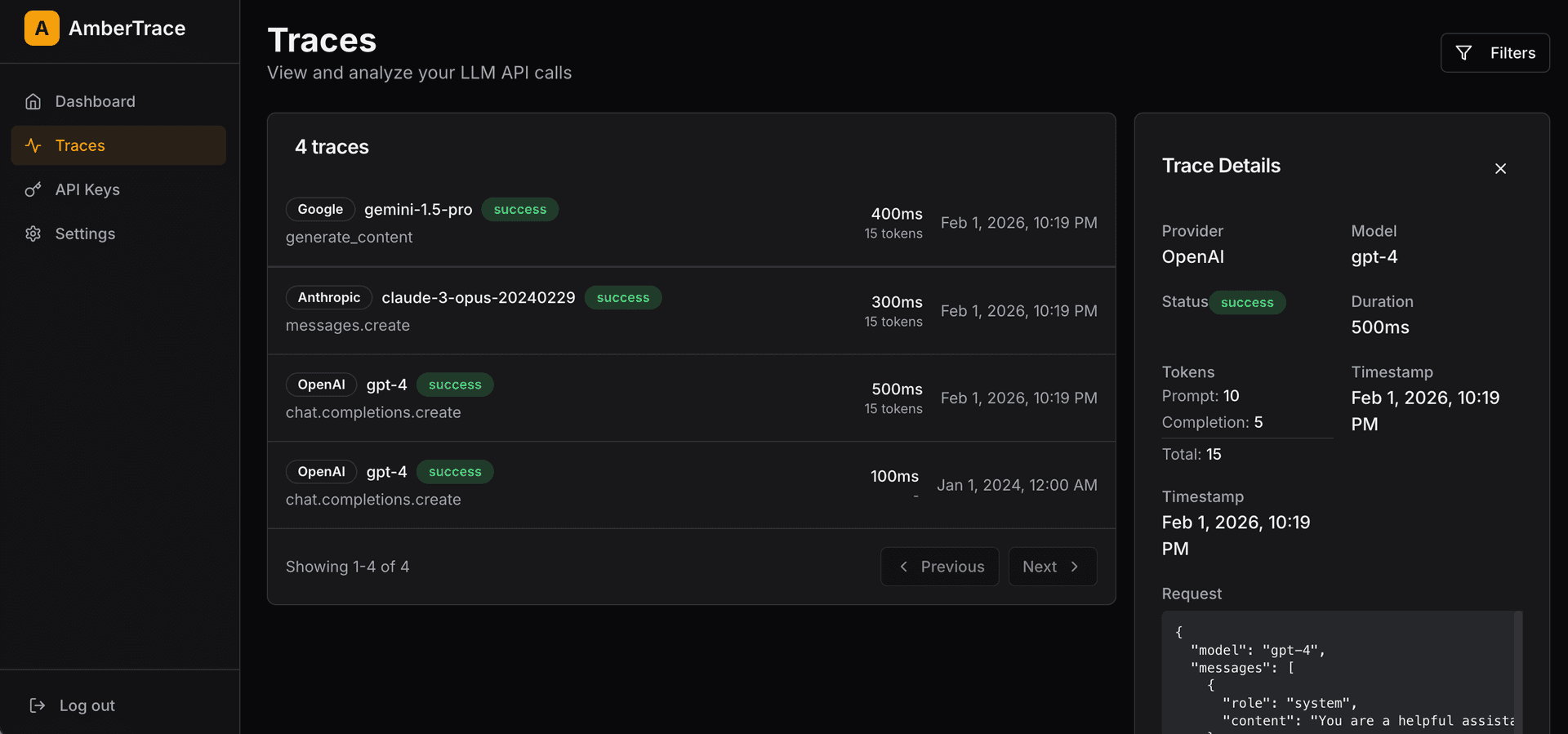
Cost breakdown by endpoint. Instead of one aggregate number on your provider invoice, you see exactly which routes in your Python application are driving spend. The /summarize endpoint using GPT-4 will look very different from /classify using Gemini.
Per-model latency. Across all three providers in one view. Useful when you're deciding whether a cheaper model is fast enough for a given task.
Token drift detection. If your system prompt grows over time, you'll see prompt token counts rise on calls that should be stable. Catch it before it doubles your bill.
Error rate by endpoint. Which routes are hitting rate limits, timeouts, or auth errors — and how often.
Can you trace multiple LLM providers with one line of Python?
This is worth emphasizing because it's different from most LLM observability tools: ambertrace.init() traces every provider automatically. You don't call it once per provider, and you don't need separate configuration for OpenAI vs. Anthropic vs. Google.
# This single line instruments OpenAI, Anthropic, and Google
ambertrace.init(ambertrace_api_key="your_ambertrace_api_key")

# All three clients are now traced
openai_client = openai.OpenAI(...)
anthropic_client = anthropic.Anthropic(...)
genai.configure(...)
If you're routing different tasks to different models — GPT-4 for complex reasoning, Claude for long documents, Gemini for classification — you'll see the cost and latency breakdown for each in a single dashboard. One SDK, every provider, full Python LLM observability.
Next steps
Now that you have LLM observability in place for your Python app:
- Set up cost alerts in your AmberTrace dashboard so you know within minutes if a call pattern goes wrong, not at the end of the month
- Check your token counts per endpoint. If prompt tokens are higher than expected, your system prompt may have drifted.
- Look at error rates. Any endpoint with a non-zero error rate is worth investigating, especially if it's a background job with retry logic.
- Read the full docs at docs.ambertrace.dev for advanced configuration, filtering, and alerting.
If you run into anything or want to share what you're seeing in your data, reach out at hello@ambertrace.dev.
Further reading
- Why We Built AmberTrace — the problems we found talking to 30+ AI engineering teams
AmberTrace is an OpenTelemetry-native LLM observability platform. Zero-code instrumentation for OpenAI, Anthropic, and Google APIs. docs.ambertrace.dev · Sign up free